Appearance
Optimizing Site Loading Speed
This mini article highlights important reasons why websites can be slow. Knowing what causes slow performance is key to better optimization and smarter long-term decisions.
The primary bottlenecks for a slow WordPress site are:
❌ Slow web hosting
❌ Large, unoptimized images
❌ Lack of server caching
❌ Unminified CSS & JS files
❌ Gzip compression turned off
Pick Good Web Hosting
When a visitor opens your site, the server processes the request. If it:
- Is shared among many websites
- Runs on poor hardware
- Has a limited connection
- Offers minimal resource allocation
... then your site will be slow no matter what else you do. The solution is simple: do not buy cheap hosting. A quality hosting provider is the first step toward a faster site.
Compress Your Images
Unminified images with large resolutions significantly affect loading speed. Use images no larger than 1920×1280. For optimization, try the free TinyPNG tool to reduce file sizes.
While building the theme’s demo content, all images were optimized with TinyPNG. You can optimize directly in the browser (up to 20 images for free) or use the official TinyPNG WordPress plugin. The plugin is convenient and time-saving but may cost money if your site has many images.
Generate Static HTML files
WordPress relies on PHP to communicate with a database for each page load. If your site is rarely updated (e.g., a portfolio), you can speed it up by generating static HTML pages.
Use the free WP Super Cache plugin, which is flexible and tested with Asli. It also supports AJAX transitions.
Optimize CSS & JS assets
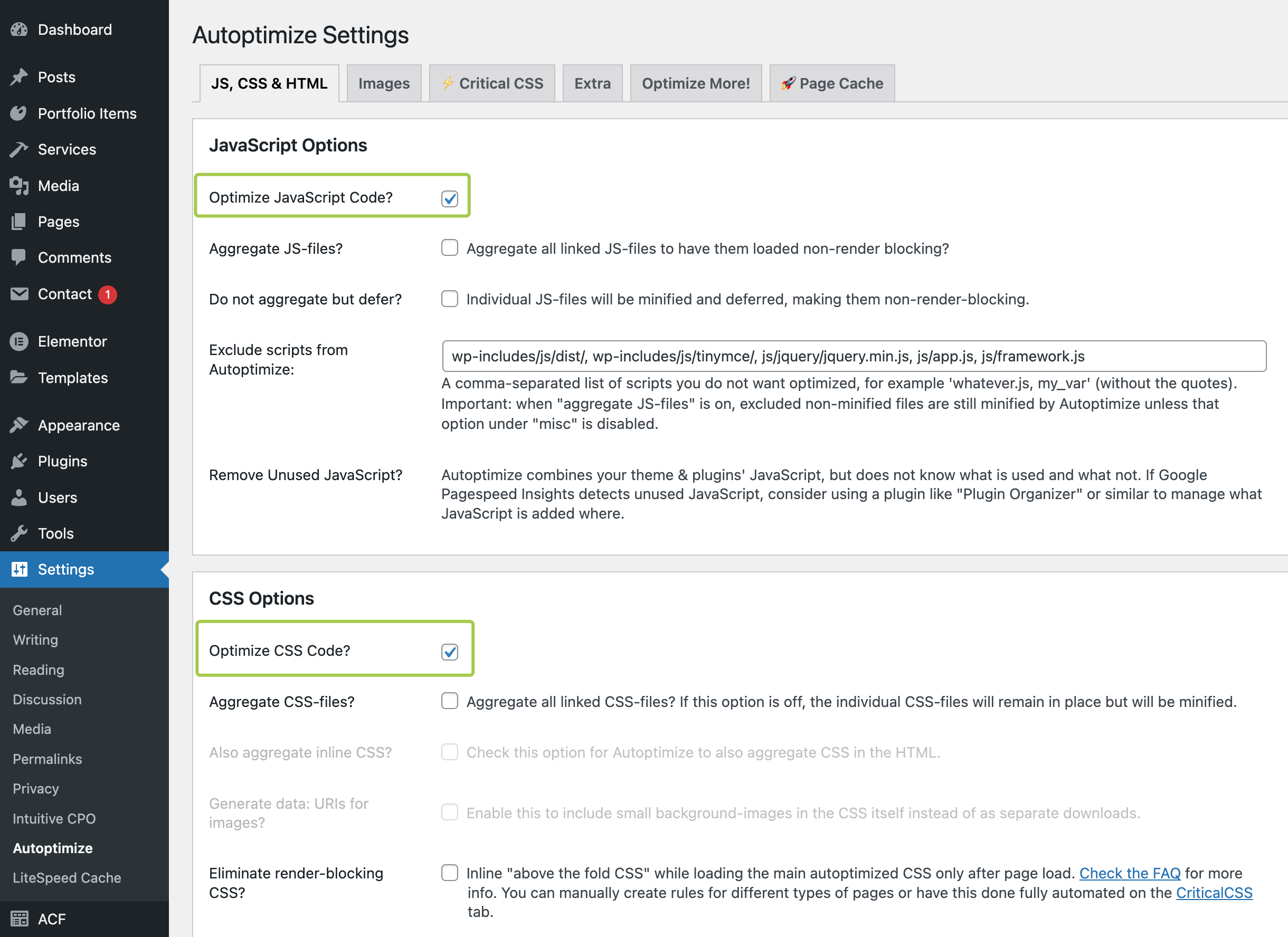
Autoptimize can aggregate, minify, and cache both scripts and styles. Setup is simple:
- Go to “Settings → Autoptimize → JS, CSS & HTML”
- Apply recommended settings
WARNING
Avoid using the HTML minifier in Autoptimize because it may cause issues with AJAX transitions. Gzip compression provides better, issue-free results.

Enable Gzip
Gzip compression can save up to 70% bandwidth when transferring text-based assets such as CSS, JS, and HTML. Useful references: