Appearance
Customizing Post Type URLs
The theme registers custom post types with default URL slugs:
- Portfolio Items use
/portfolio/- Example:https://mywebsite.com/portfolio/my-project - Services use
/services/- Example:https://mywebsite.com/services/web-design
You can customize these URL structures to match your preferences.
Changing the Slug
Want to change /portfolio/ to /works/ or /projects/? Install the free Simple Post Type Permalinks plugin, which extends WordPress's Settings → Permalinks panel.
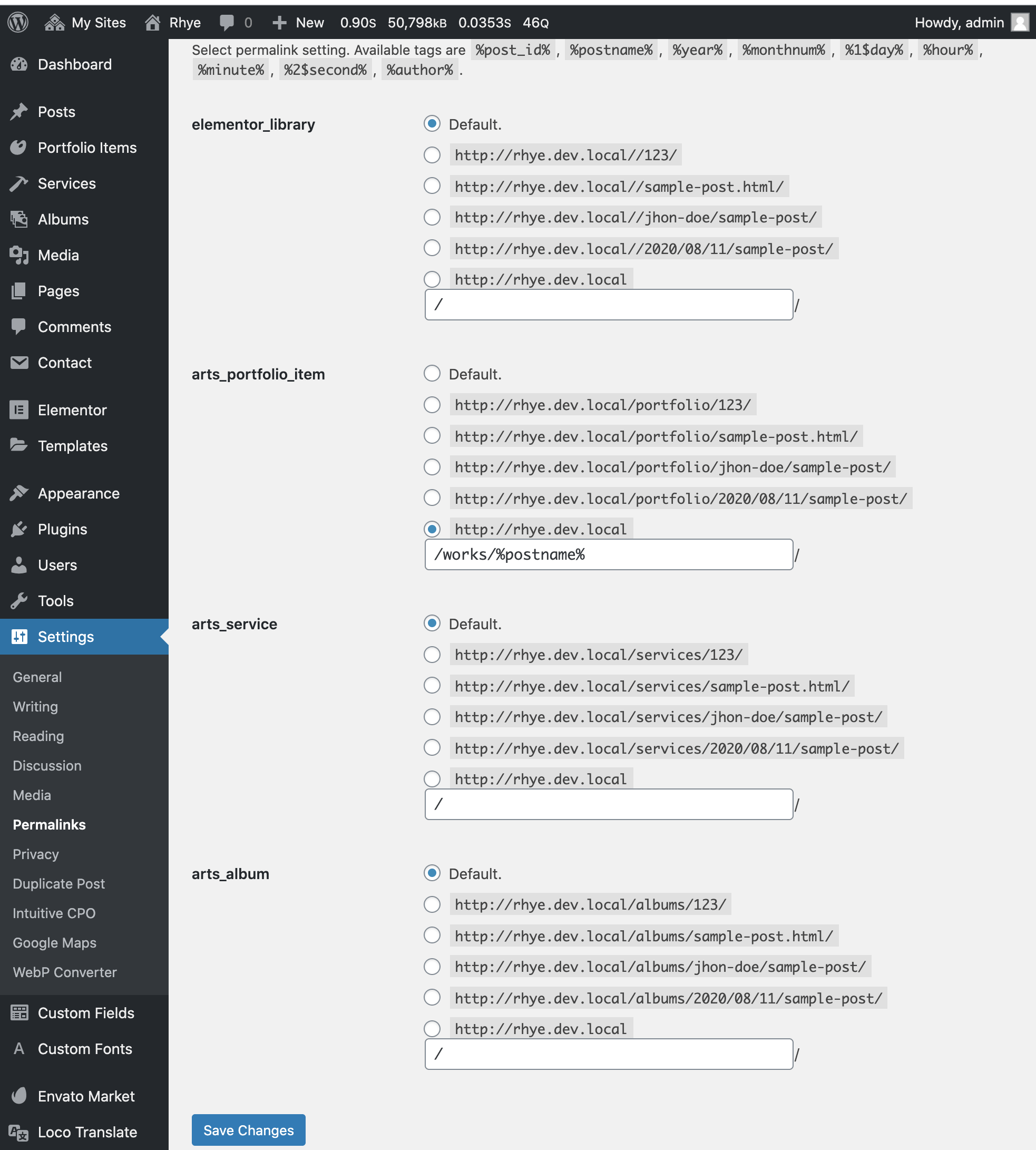
After installation, go to Settings → Permalinks to configure your custom slugs.
Removing the Base Entirely
Want to remove the slug base completely? For example, change https://example.com/portfolio/my-project/ to https://example.com/my-project/ (same URL structure as regular pages).
Use the free Remove CPT Base plugin for this task.
This creates cleaner URLs but may cause conflicts if you have pages and portfolio items with the same slug.
Related Customizations
- Customize post type labels — Change names and settings
- Create and manage posts — Add content
- Reorder posts — Control display order