Appearance
Wordpress Installation
Before installing the Trigger theme, you need to have a working WordPress installation.
- Download WordPress from wordpress.org
- Upload files to your web server
- Create a MySQL database
- Run the installation script at your website URL
For detailed instructions, see the official WordPress installation guide.
Server Requirements
| Requirement | Recommended |
|---|---|
| WordPress | 6.9+ |
| PHP | 8.3+ |
| MySQL | 8.0+ |
| MariaDB | 10.11+ |
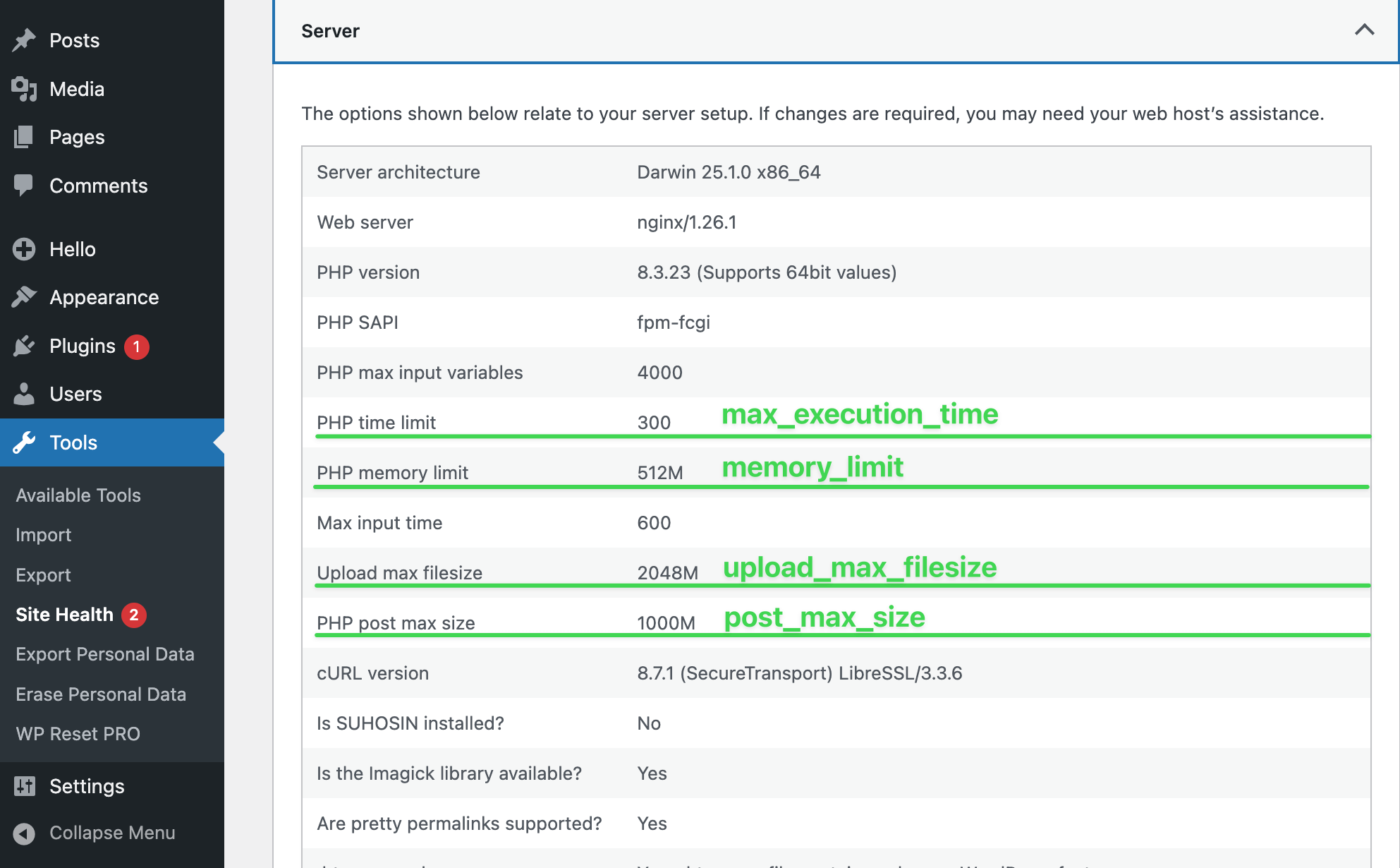
| Max Execution Time | 300s+ (for correct demo import) |
| Memory Limit | 256MB+ |
| Max Upload Size | 64MB+ |
PHP Extensions
Required
hash- Password and package hashingjson- Data interchange format
Recommended
curl- Remote request operationsdom- Text Widget validationexif- Image metadata processingfileinfo- File upload mimetype detectionimagick- Better image quality for media uploadsmbstring- UTF-8 text handlingopenssl- SSL-based connectionszip- Plugin/theme installation
Checking Configuration
Navigate to Admin Panel -> Tools -> Site Health -> Info -> Server in your WordPress admin panel to verify your server meets these requirements before importing demo data to the theme.