# Contact Form 7
Kinsey is compatible with the popular plugin Contact Form 7 (opens new window) for sending messages through your website.
TIP
This plugin is recommended by the Kinsey theme, so you are likely to already have it installed. If not, just search for it and install it from the WordPress Plugins directory in Plugins → Add Plugin.
Let’s set up the plugin.
# ▶️ Step 1.
From the admin panel, go to Contact → Contact Forms. If you have correctly imported the demo data, you should see a form with a shortcode here.

# ▶️ Step 2.
Click on the form Kinsey Contact Form 2 Columns and open the Mail tab. Here you can configure where your messages from the contact form will be sent.

Save button# ▶️ Step 3.
Copy the form shortcode. This is just an example. The ID and title may be different in your panel, and that's normal.
[contact-form-7 id="939" title="Kinsey Contact Form 2 Columns"]
# ▶️ Step 4.
Now edit a page with Elementor where you want to place your contact form. Use the standard Shortcode Elementor widget.

Apply# ▶️ Step 5.
Now your contact form is ready, and you can test if it works. If you'd like to change labels for the fields, button, or heading, you can do this by going back to the admin panel to Contact → Contact Forms → Kinsey Contact Form 2 Columns.
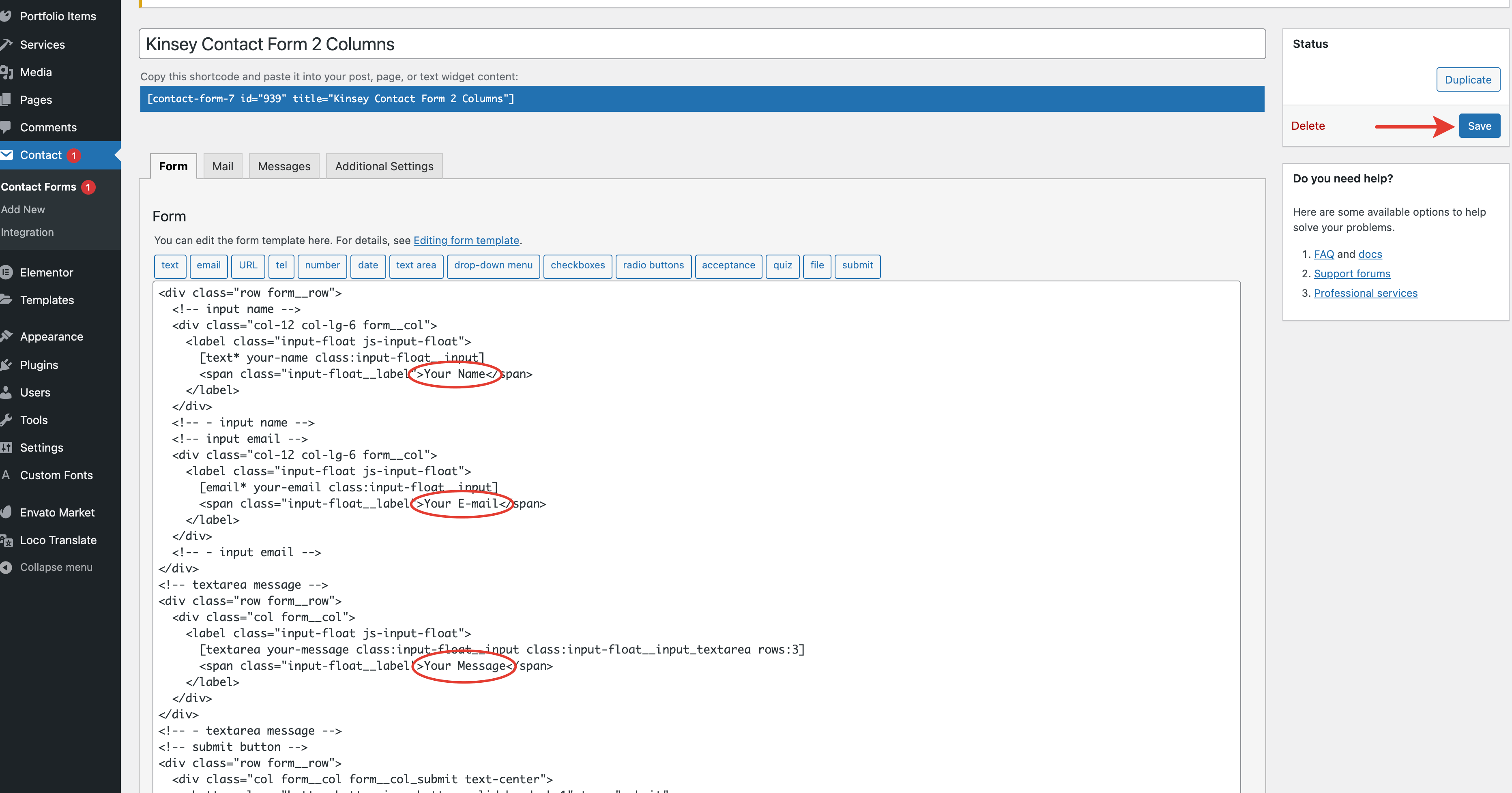
SaveMissing the form shortcode?
In case you don’t see an imported shortcode (which ships together with the demo content), you can create a new one by yourself. Just add a new contact form in Contact → Contact Forms and paste this HTML code in the Form tab:
<div class="row form__row">
  <!-- input name -->
  <div class="col-12 col-lg-6 form__col">
    <label class="input-float js-input-float">
      [text* your-name class:input-float__input]
      <span class="input-float__label">Your Name</span>
    </label>
  </div>
  <!-- - input name -->
  <!-- input email -->
  <div class="col-12 col-lg-6 form__col">
    <label class="input-float js-input-float">
      [email* your-email class:input-float__input]
      <span class="input-float__label">Your E-mail</span>
    </label>
  </div>
  <!-- - input email -->
</div>
<!-- textarea message -->
<div class="row form__row">
  <div class="col form__col">
    <label class="input-float js-input-float">
      [textarea your-message class:input-float__input class:input-float__input_textarea rows:3]
      <span class="input-float__label">Your Message</span>
    </label>
  </div>
</div>
<!-- - textarea message -->
<!-- submit button -->
<div class="row form__row">
  <div class="col form__col form__col_submit text-center">
    <button class="button button_icon button_solid bg-dark-1" type="submit">
      <span class="button__label button__label-normal">
        <span class="button__title">Send Message</span>
        <span class="button__icon button__icon_after knz-arrow-right"></span>
      </span>
      <span class="button__label button__label-hover">
        <span class="button__title">Send Message</span>
        <span class="button__icon button__icon_after knz-arrow-right"></span>
      </span>
    </button>
  </div>
</div>
<!-- - submit button -->
For more information on how to set up your e-mail settings and templates, please check the official Contact Form 7 Documentation (opens new window).