Appearance
AJAX Transitions
One of the key features of Rhye is its seamless transitions between pages. This technique is called AJAX or, to be more precise, PJAX. It can be enabled in Customizer → Theme Options → AJAX Transitions.
Permalinks Structure
There is an important requirement to make AJAX transitions function properly. You have to set your permalinks structure to any style EXCEPT Plain.
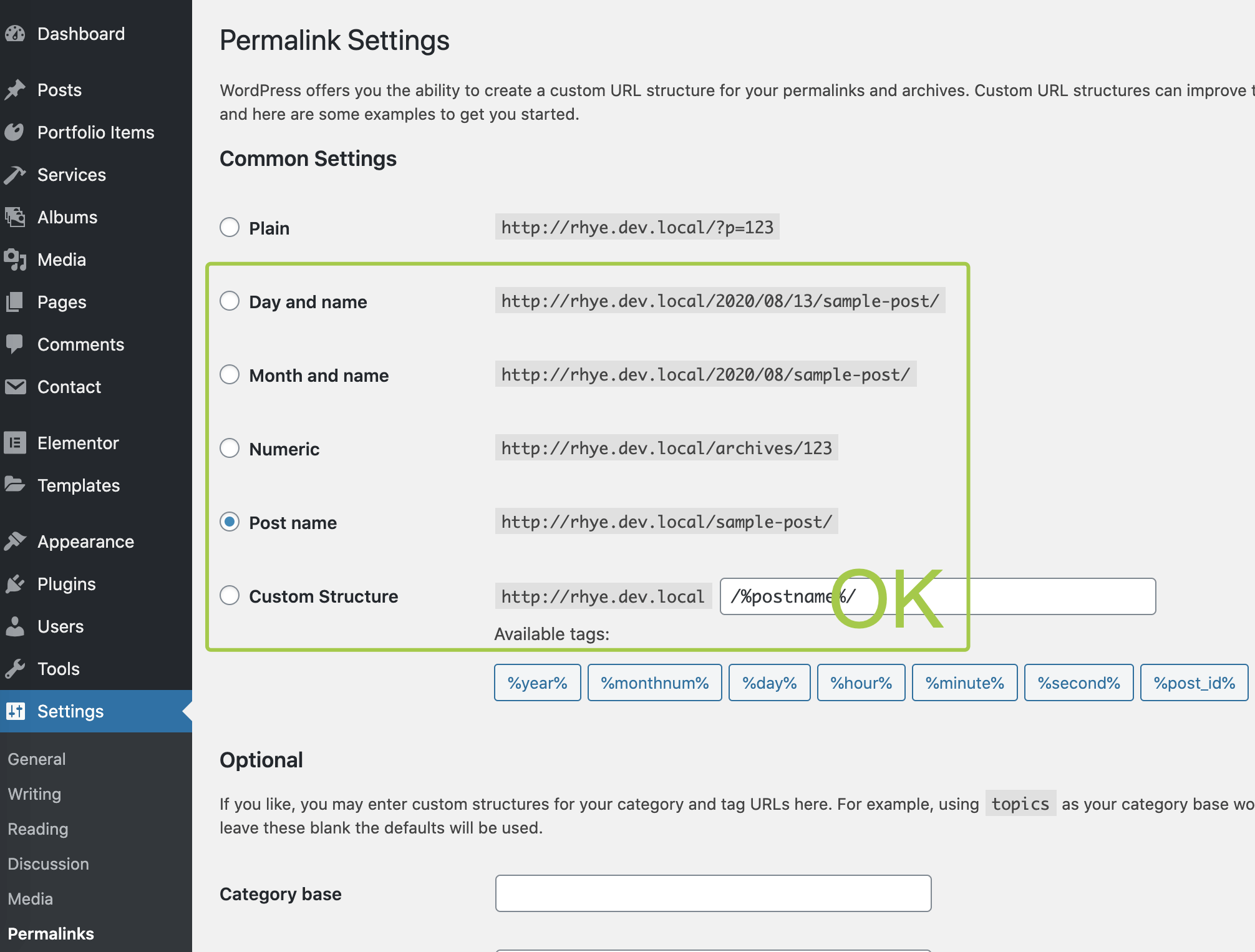
Plain permalinks style is not compatible with AJAX transitionsPreventing Links Conflicts
If you want certain links to be prevented from AJAX transition, you can specify their jQuery selectors in Customizer → Theme Options → AJAX Transitions. This may be useful if a 3rd-party plugin outputs a markup with an <a href="https://...">...</a> tag but you don't want to go to another site page by clicking on it (for example, it can be a Lightbox Gallery).
There are some built-in rules that already handle some common cases for you:
js
'[target=_blank]', // links that open in a new window
'[data-elementor-open-lightbox]', // Elementor lightbox gallery
'.lang-switcher a', // Polylang & WPML language switcher
Excluding Specific Pages
Some of the 3rd-party scripts and plugins are technically impossible to make AJAX compatible. To let them function properly, the browser has to perform a page refresh to reload and initialize the page scripts. If you don't want to turn off AJAX navigation completely for the whole website, there is a possibility to exclude a certain page from AJAX.
While in Edit with Elementor mode, go to Document Settings → Page Transition. There you may tune the AJAX router rules for that specific page.

Excluding WooCommerce Pages
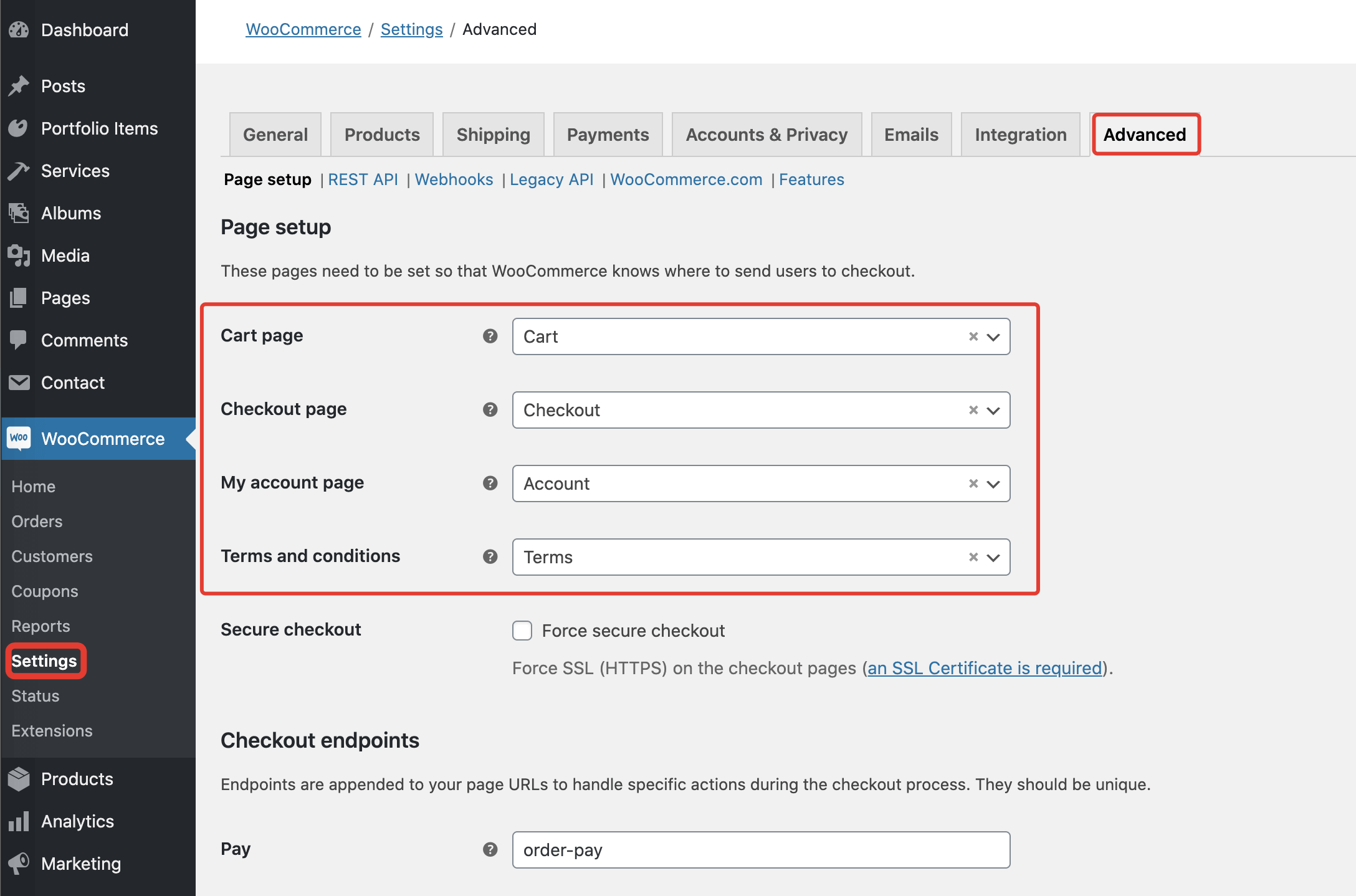
Rhye theme is NOT compatible with WooCommerce. There are no layouts or styling for the shop pages provided by the theme. If you'd like to use WooCommerce anyway, you need to exclude WooCommerce pages from AJAX navigation to avoid any issues with the store frontend.
Once WooCommerce is activated, a toggle will appear which allows you to exclude all the WooCommerce pages from AJAX navigation in one click.

Extending Plugins Compatibility
JavaScript plugins don't work after page transition?
When extending the theme functionality with a JavaScript plugin that’s not included in the package, you may run into an issue. Your plugin may work well after the initial site load. But when it comes to any AJAX transition, it doesn’t initialize. This is an expected behavior due to the nature of AJAX technology.
Normally, the page initializes scripts each time it's loaded by the browser. But when AJAX navigation is enabled, it loads only once initially. The rest of the navigation is performed without any page refresh. So to make the 3rd-party scripts work, you need to re-init them manually each time an AJAX transition occurs.
The theme has a special field where you can place JavaScript initialization code for your scripts.

Updating Head Styles
Some 3rd-party scripts load their CSS files on the pages only whenever it's required. While this approach is good in terms of assets optimization, it doesn't work when it comes to AJAX navigation where all the resources have to be loaded once right after the initial page render. However, it's still possible to selectively refresh/load the stylesheets based on their IDs.
There is an Update Page Head Nodes field in Customizer → Theme Options → AJAX Transitions. There you may define what styles the theme needs to look for and update them if required.
The field accepts HTML selectors and may be useful to add compatibility with 3rd-party Elementor addons.
js
'link[id*="eael"]', // Essential Addons plugin post CSS
'link[id*="theplus-"]', // ThePlus Elementor addon post CSS
'style[id*="eael"]', // Essential Addons plugin inline CSS
'style[id*="theplus-"]', // ThePlus Elementor addon inline CSS